Reads handwriting directly
No retyping or transcribing answers first: it marks straight from a photo of the actual completed paper, handwriting and all.
No waiting for a slot
Results appear on screen the moment a paper's uploaded, any time of day, without booking marking in or waiting for a scheduled turnaround.
Builds a real record
Every marked paper is saved to the account's paper history automatically, so scores accumulate into a record over time rather than a one-off result.
Three steps, start to finish
This is the exact flow on the real upload form: nothing simplified or left out for this page.
Upload a photo or PDF
Take a photo of a completed paper, or upload a PDF: JPG, PNG and PDF are all accepted. Up to 10 pages can go in as one upload, and they're read together as a single continuous paper, so an answer that lands on a later page than its question is still matched up correctly.
Choose exam type and year group
Pick 11+ or SATs, and Year 4, 5 or 6. This tells the marking what standard to hold the paper to before it looks at a single answer.
Get the result back on screen
The marked result appears in the same tab, on the same page: no waiting for a scheduled slot and no separate app to check back on later.
Every marked paper returns the same four things
A blank paper doesn't just score 0%
There's a "this paper is blank" checkbox on the upload form for a paper with no answers written on it yet. Ticking it before uploading skips scoring entirely and instead returns a full mark scheme (every question on the paper alongside its correct answer), so it works as an answer key rather than penalising a paper that was never meant to be marked in the first place.
A paper that's only partly answered is treated as a normal submission and marked question by question exactly as it stands. This option is only for a genuinely blank paper.
A real result screen, not a mockup
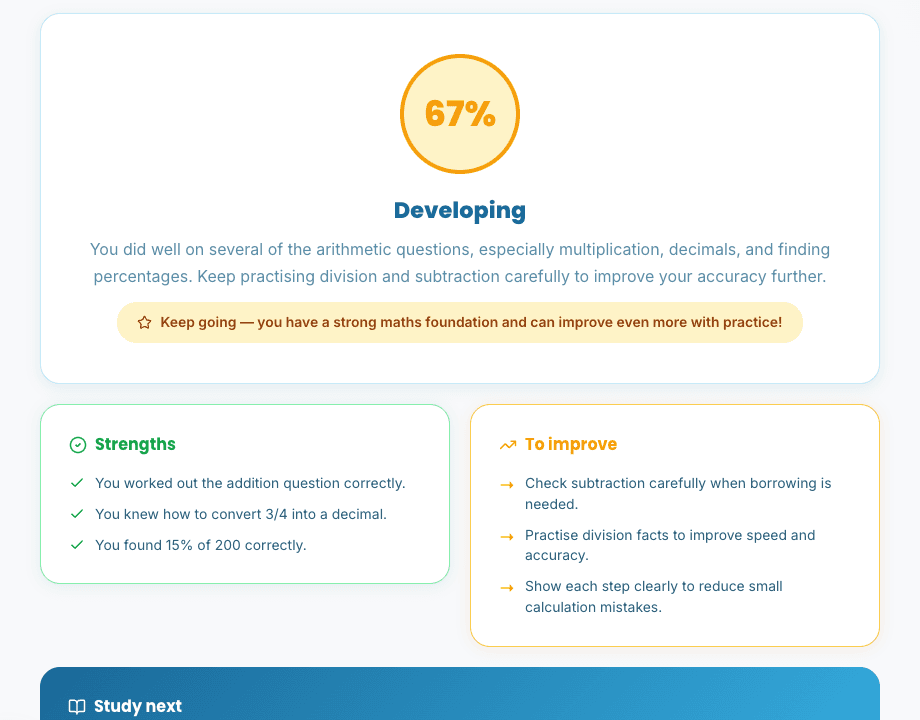
This is an unedited screenshot of the real result screen, taken after actually uploading a completed Year 5 maths paper through the live feature: the score, summary, strengths and improvements below are exactly what came back.
Frequently asked questions

Ready to get a paper marked?
This page is the honest walkthrough: the real upload form is one sign-in away.